 PreApply by abbox
See every question before you apply.
Many accelerators ask for your name, email and phone number first and only show the real questions later. PreApply shows the whole application up front, so you can judge your chances before you hand over your details.
Works on Chrome and other Chromium browsers. No account needed.
How it works
No sign-up, no setup. Install it and browse accelerator websites as usual.
Visit an accelerator
On a supported accelerator's site, a small PreApply pill appears in the corner with the number of questions.
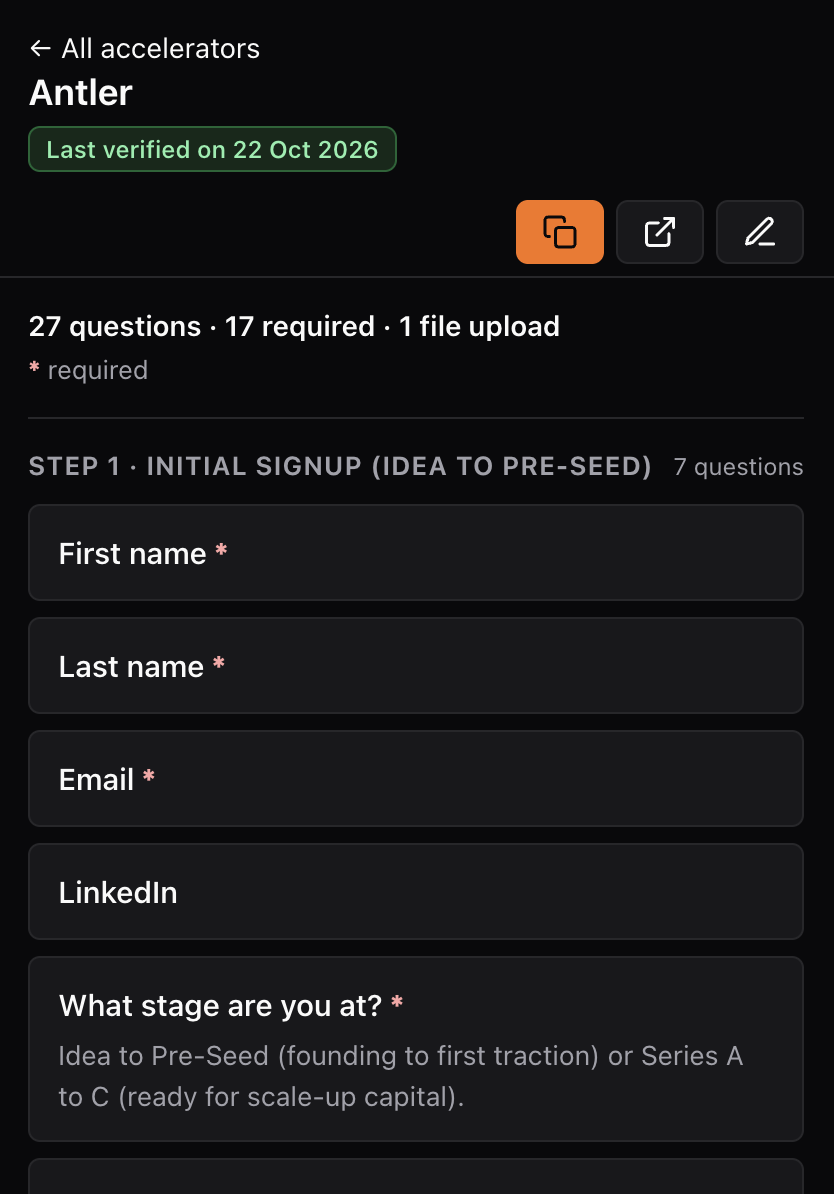
See the whole application
Every step and every question, in order, with required ones marked, word limits and the form's own hints.
Prepare before you apply
Copy all questions in one click and paste them into your AI agent or notes to draft answers, or save them for later.
Accelerators covered
Questions are copied from the real forms by founders and checked before they're added. Each one shows when it was last verified.
Missing one? Add its questions in a couple of minutes, no Git needed.
Private by design
PreApply is built so there's nothing to leak.
Never reads your forms
It doesn't read what you type into websites and never fills anything in.
No accounts, no tracking
No sign-up, no analytics, no cookies. Its only network request downloads the public question list.
Open source
The code and the question data are public on GitHub. Anyone can check them or contribute.